The scheduling and invoicing app built for caterers
Catering is deadline cooking: every booking has a headcount, a dietary minefield, a delivery window, and a deposit that needs collecting. MyKlient keeps each event's details attached to the client — from tasting to final payment.
Bookings with prep days visible around them
Bookings land on the calendar with prep days visible around them, so Friday's plated dinner and Saturday's drop-off don't collide in the kitchen. Weekly corporate lunch clients recur on their own. Tastings book like any other visit, attached to the event they're auditioning for.
Headcounts, allergies, and loading-dock codes
The client card remembers the headcount history, the nut allergy at every third table, the loading-dock door code, and which menu they raved about last time. Repeat orders start from what worked instead of a blank page. Venue quirks live here too — which kitchens have no ovens, which docks close at five.
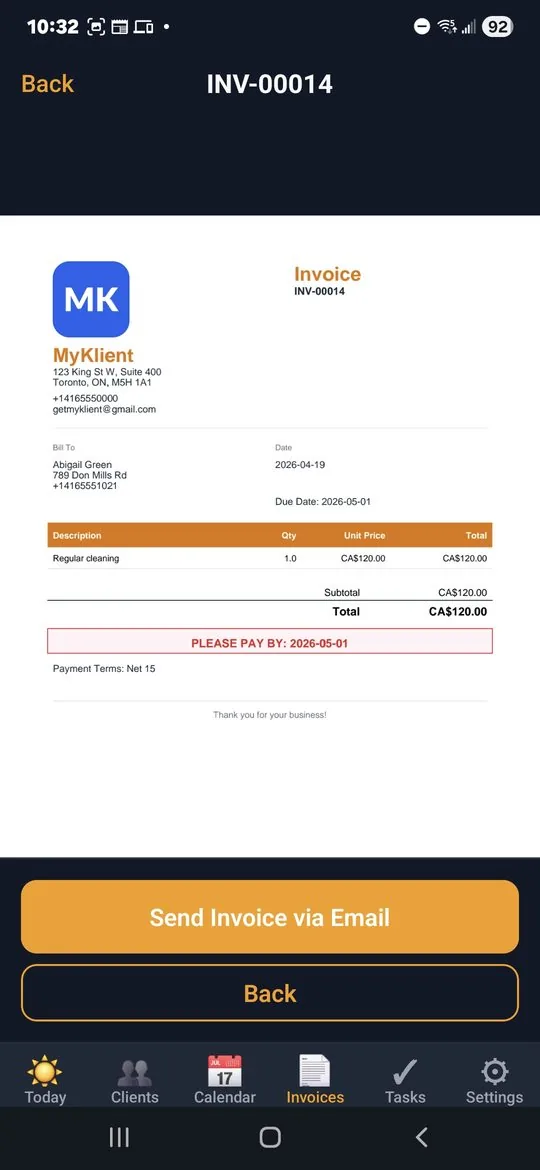
Deposits up front, balance after the final count
Quote the menu, invoice the deposit, and collect the balance after the event — branded PDFs with per-item lines for food, staff, and rentals. Paid and unpaid roll up by month, which is how catering cash flow actually breathes. Final counts adjust the balance invoice in minutes, not in a spreadsheet at midnight.
Confirm the headcount before the shopping list
A day-before confirmation text — headcount and delivery window — prevents the expensive surprises. 'On my way' on event morning tells the site contact when to prop the door. Photos of the setup close the loop with clients who weren't on site.
Drop-off and full-service, ready on sign-up
Catering is pre-loaded in MyKlient — pick it at sign-up and Drop-Off and Full-Service catering arrive as ready-made service types, with checkmarks to match. Rename them around your menu structure, Quick Add your clients, and holiday season is organized before the ovens preheat. The app runs in English and Spanish — like a lot of kitchens do.
Questions caterers ask
Can it track headcounts and dietary restrictions?
Yes. Each client card holds headcount history, allergy notes, the loading-dock code, and which menu they raved about last time — so repeat orders start from what worked.
How do deposits and final invoices work for catering?
Quote the menu, invoice the deposit, and collect the balance after the event, with food, staff, and rentals as separate line items on a branded PDF. Final counts adjust the balance in minutes.
Does it handle recurring corporate lunch accounts?
Weekly corporate clients recur on their own schedule alongside one-off events, and prep days stay visible around each booking so the kitchen never gets double-booked.
Can I confirm details the day before an event?
A one-tap text confirms headcount and delivery window the day before — which prevents the expensive kind of surprise — and 'On my way' tells the site contact when to prop the door.
Simple pricing — no ads, ever
Up to 5 clients, every feature included.
Up to 20 clients, invoice PDFs, SMS automation. Or $49/year.
Unlimited clients, team logins, per-person permissions, audit log. Or $129/year.
Annual billing saves about 27%. Cancel anytime. Full plan details →
Try MyKlient free
Free for your first 5 clients — every feature, no card required. In English and Spanish.


MyKlient is also built for cleaners, DJs, electricians, event planners, and other trades — see everything it does →