The HVAC billing and scheduling app built for solo technicians
HVAC swings between planned and urgent: spring and fall tune-up season, then a heat wave fills the week with no-cool calls. MyKlient keeps maintenance plans on schedule while emergency jobs slot into the gaps — and every invoice goes out before you leave. It is an HVAC billing app first: quotes, parts-and-labour invoices, and paid, unpaid, and tax totals by week, month, quarter, and year.
Maintenance plans and emergency calls in one day view
Recurring spring and fall maintenance visits book themselves a season ahead. When an emergency call comes in, you see today's gaps instantly and squeeze it in — and a one-tap 'Running late' text keeps the next customer patient.
Model numbers, filter sizes, and last service on file
The client card holds what the basement will make you forget: furnace and AC model and serial, filter sizes, last service date, breaker panel location, and photos from previous visits. Repeat calls start with context instead of archaeology. Maintenance-plan customers are flagged as such, so you know who gets priority when the first heat wave hits.
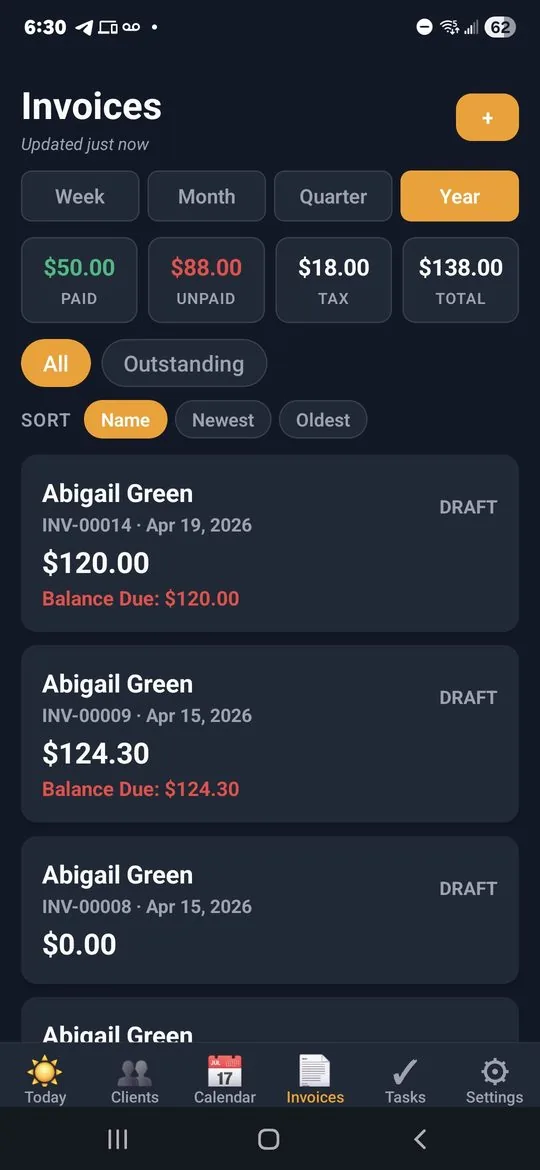
HVAC billing: quote the repair, invoice the parts and labour
Quote the repair, get the nod, then send a branded invoice with parts and labor as line items. Week, month, quarter, and year tabs show exactly how tune-up season and emergency season each performed.
Time-window texts that protect your reputation
Time windows are HVAC's reputation-maker: 'On my way' and 'Running late' texts are one tap, and 'Job completed — invoice sent' follows the moment you finish. A quick broadcast in April — 'AC tune-up slots are booking' — reaches your whole client list from your phone and fills shoulder-season weeks.
HVAC service types ready to shape into your tune-ups
HVAC runs on the Home Maintenance preset: pick it at sign-up and an HVAC Service type arrives with its checkmarks — filter, thermostat, coils, refrigerant, ductwork — ready to shape into your tune-up routine — a checklist the customer can see reflected on the invoice. Quick Add your maintenance-plan customers and the fall rush is on the calendar before it starts.
Questions hvac technicians ask
Can MyKlient handle seasonal HVAC maintenance plans?
Yes. Recurring spring and fall visits book a season ahead, so tune-up customers are already on the calendar when the first heat wave fills your week with no-cool calls.
How do I fit an emergency call into a booked day?
The day view shows your gaps, so you can slot the call in and send a one-tap 'Running late' to the customers behind it — which is usually the difference between an inconvenience and a bad review.
Does it store equipment details for each customer?
Furnace and AC model and serial numbers, filter sizes, breaker panel location, and photos from previous visits all live on the client card, so a repeat call starts with context instead of a search.
Can I quote a repair and then invoice it?
You can send a quote, and once the customer approves the work you invoice it with parts and labour as separate line items on a branded PDF. Paid, unpaid, and tax totals roll up by week, month, quarter, and year.
Simple pricing — no ads, ever
Up to 5 clients, every feature included.
Up to 20 clients, invoice PDFs, SMS automation. Or $49/year.
Unlimited clients, team logins, per-person permissions, audit log. Or $129/year.
Annual billing saves about 27%. Cancel anytime. Full plan details →
Try MyKlient free
Free for your first 5 clients — every feature, no card required. In English and Spanish.


MyKlient is also built for landscapers, personal assistants, pest control operators, pet care providers, and other trades — see everything it does → Comparing software? What Jobber costs a solo tech.